Have you ever had a photograph that looked perfectly sharp on your computer or phone but looked blurry or pixelated when printed?
You’re not imagining it.
Computer screens and professional printing have very different requirements. An image can look great on a screen while simply not containing enough information to reproduce sharply in print.
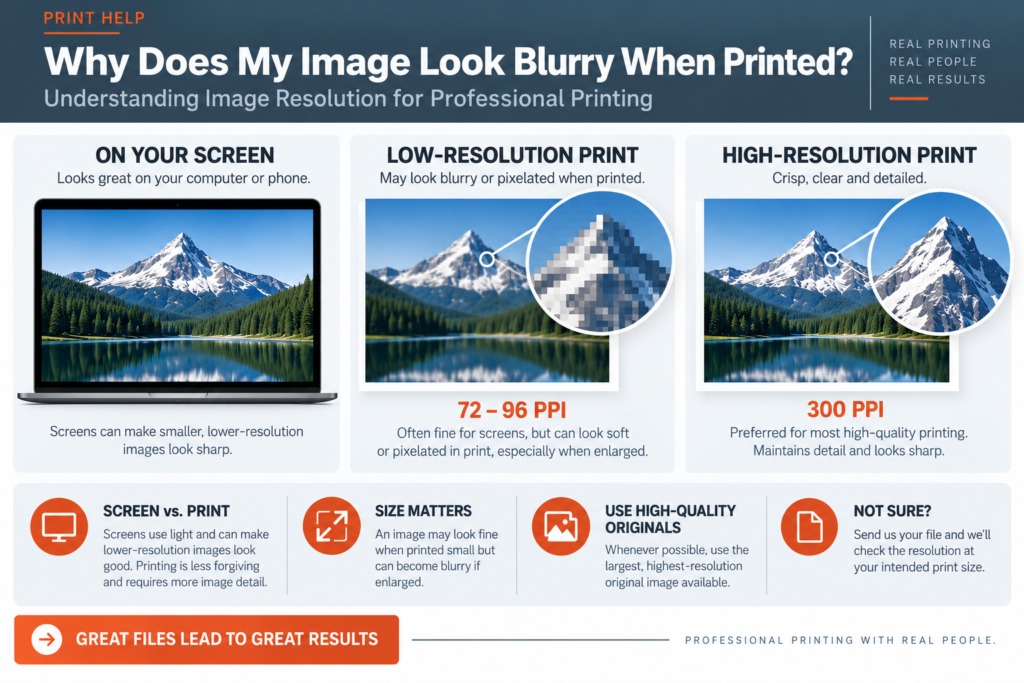
Digital photographs are made up of tiny squares called pixels.
Image resolution describes how much image information is available within a given area.
For professional printing, we generally want enough pixels available to reproduce the image smoothly and sharply at the actual size it will be printed.
For most high-quality printing, approximately 300 pixels per inch (PPI) at the final printed size is preferred.
Your phone and computer screen can make relatively small images look surprisingly good.
Printing is less forgiving.
Once that same image is enlarged and reproduced on paper, there may not be enough pixels available tomaintain the detail you saw on your screen.
The result can be an image that looks:
This is one of the most important things to understand about digital images:
An image may have enough resolution when printed small but not enough resolution when printed large.
For example, a photograph might reproduce beautifully at 3″ × 5″ but look noticeably soft if enlarged to fill an 11″ × 17″ poster.
The larger you make an image, the farther apart its available pixels have to spread.
That’s why we evaluate image resolution at the final size the image will actually be printed.
Unfortunately, not necessarily.
Simply changing a number from 72 PPI to 300 PPI does not automatically add real photographic detail that wasn’t present in the original image.
It’s a little like enlarging a small photograph with a magnifying glass. You can make it bigger, but the magnifying glass can’t create detail that wasn’t captured in the first place.
Whenever possible, start with the largest, highest-quality original image available.
Images copied from websites, social media, email signatures and online previews are often optimized for screens rather than professional printing.
They may look excellent online while containing relatively little image information.
Whenever possible, avoid copying an image directly from a website or taking a screenshot.
Instead, locate the original photograph or original high-resolution artwork.
Canva doesn’t automatically make a low-resolution image high resolution simply because you place it into a design or export the design as a PDF.
If you upload a small image and enlarge it significantly, the image may still print soft or pixelated.
Pay attention to any image-quality warnings Canva displays, and whenever possible upload the highest-quality original image.
For logos, illustrations and other line artwork, a vector file is often preferable to a photograph-based file.
Vector artwork can generally be enlarged without becoming pixelated.
Common vector or print-friendly formats may include PDF, EPS and SVG, depending on how the artwork was originally created.
If you have several versions of your logo and aren’t sure which one to send, send us what you have and we’ll help determine which file is best.
As a general guideline:
Around 300 PPI at final size — preferred for most high-quality printing.
Around 150–200 PPI at final size — may be acceptable for some larger-format projects that are viewed from farther away.
Very low resolution — may produce visible softness or pixelation, particularly when enlarged.
These aren’t absolute rules. The type of image, printing process, finished size and normal viewing distance all matter.
A photograph on a business card and an image on a large display viewed from across a room don’t necessarily require the same effective resolution.
Send us the file.
At SIG-1, we can look at the effective resolution at the size you actually intend to print it and let you know if we see a potential problem.
If your image doesn’t have enough resolution, we’ll tell you before production whenever possible.
Because discovering that your photograph was too small after the job has been printed isn’t good for you or for us.
SIG-1 Graphics
Professional printing with real people looking at your files.
Sacramento, California

Combining old world artisan craftsmanship with cutting edge technology, Sig-1 exerts a visual mastery over every printed document and image it produces. Sig-1’s failsafe printing methods offer meticulous attention to detail, high touch personal service, served with a creative and quirky style that turns every print job into a delightful experience.

