Designing a business card and designing an eight-foot banner are obviously different projects.
But one of the biggest differences isn’t just physical size.
It’s how the artwork needs to be prepared.
Large-format printing includes projects such as:
The good news is that you usually don’t need to build an enormous file at an enormous resolution.
You just need to understand a few basic principles.
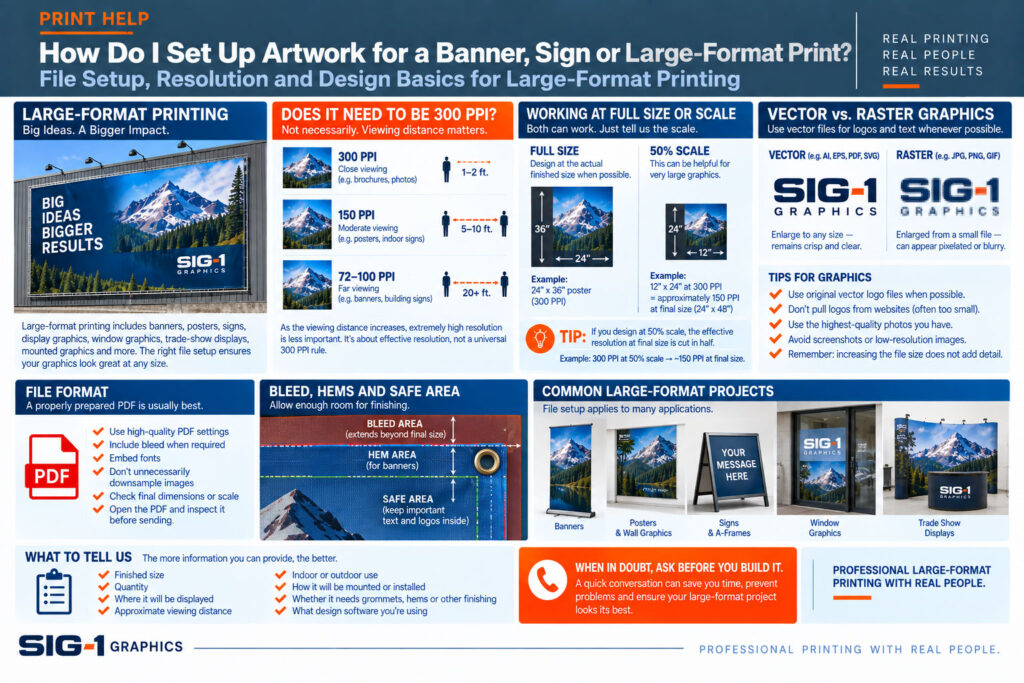
Not necessarily.
For smaller printed pieces viewed at close range, approximately 300 PPI at final size is a common target.
Large-format graphics are different.
A brochure might be viewed from 12 inches away.
A poster might be viewed from several feet away.
A banner might be viewed from across a room—or across a parking lot.
As viewing distance increases, extremely high image resolution becomes less important.
That’s why blindly building every large-format project at 300 PPI can create enormous files without producing a meaningful visual improvement.
Imagine a photograph in a magazine.
You may hold it a foot from your face, so fine detail matters.
Now imagine the same photograph on an eight-foot display viewed from 15 feet away.
Your eye isn’t examining individual pixels from that distance.
This is why large-format resolution should be evaluated based on:
There isn’t one resolution number that’s correct for every large-format project.
This is one of the most useful concepts in printing.
An image has a certain number of pixels.
When you make the image larger, those pixels are spread across a larger area.
That lowers its effective resolution.
For example, an image that has plenty of resolution when printed at 8″ × 10″ may not have enough detailwhen enlarged to 48″ × 60″.
The important question isn’t simply:
“What resolution is this image?”
It’s:
“What is the effective resolution at the size we’re actually printing it?”
SIG-1 can help you evaluate that.
Often you can.
For many banners, posters and signs, designing at the actual finished size is the simplest approach.
A 24″ × 36″ poster can generally be designed as a 24″ × 36″ document.
But extremely large projects can sometimes exceed the page-size limitations of design software or PDF formats.
In those situations, artwork can be created at scale.
For example, a 120″ × 48″ banner might be designed at 60″ × 24″, or 50% scale.
The important thing is to tell us the scale.
This is important.
If a file is designed at 50% scale, it will be enlarged 200% when produced at final size.
That means the effective resolution is cut in half.
For example:
An image at 300 PPI in a half-size layout becomes approximately 150 PPI at final output size.
So whenever you’re working at scale, resolution needs to be considered at the final printed size, not merely at the size shown in your design program.
Logos, lettering and simple illustrations are often best supplied as vector graphics whenever possible.
Vector artwork is built from mathematical shapes rather than a fixed grid of pixels.
That means a properly created vector logo can be enlarged from a business card to a large sign while remaining crisp.
Common vector-capable file formats include:
But the file extension alone doesn’t guarantee that the artwork inside is actually vector.
A low-resolution JPEG placed into a PDF is still a low-resolution image.
A logo that looks perfectly fine at the top of a website may be far too small for a large printed sign.
Web graphics are often optimized for screen display and small file size.
Whenever possible, use the original logo artwork rather than downloading or taking a screenshot of a logo from a website.
If you have an EPS, AI, SVG or vector PDF version of the logo, that’s usually a much better starting point.
Use the largest, highest-quality original photograph you have.
Avoid:
And remember:
Making the document bigger does not create additional photographic detail.
Neither does simply changing the resolution setting from 72 PPI to 300 PPI.
You can’t manufacture detail that wasn’t in the original image.
How Much Bleed Does Large-Format Artwork Need?
This depends on the product.
A trimmed poster or mounted graphic may need bleed similar to other printed pieces.
A banner that will be hemmed may require additional image area.
A graphic that wraps around the edge of a board may require considerably more material beyond thevisible face.
Displays and specialty finishing can have their own setup requirements.
So for large-format work, don’t assume that 1/8″ bleed is always the correct answer.
Ask us.
We’ll tell you what the particular product requires.
Large-format finishing can involve:
Don’t put important text or logos right against the edge unless the design specifically calls for it.
For banners in particular, leave enough room so that grommets, hems or other finishing don’t interfere with important information.
What About Fonts?
The safest large-format workflow is generally to provide a properly prepared PDF with fonts embedded.
If you’re supplying native design files, the fonts used in the project may also need to be supplied—or converted appropriately depending on the workflow.
A missing font can change:
Exporting a good PDF helps prevent many of these problems.
For finished layouts, a properly prepared PDF is usually an excellent choice.
Depending on the project, we may also work with native design files or other image formats.
When exporting a PDF:
And if the file is built at scale, tell us.
Don’t panic.
Large-format artwork can create large files.
But enormous file size doesn’t automatically mean better quality.
Sometimes an excessively large file is simply carrying far more image data than the finished product can actually display.
If your computer is struggling with the artwork—or the PDF has become several gigabytes—call us before spending hours fighting with it.
There may be a much more practical way to build the project.
When asking SIG-1 about a large-format project, tell us:
Those answers help us recommend both the product and the best way to prepare the artwork.
This is especially important with unusually large graphics.
If you’re about to create artwork for a:
give us a call first.
A two-minute conversation about size, scale, bleed and resolution can save you from building the entireproject incorrectly.
SIG-1 Graphics
Professional large-format printing with real people looking at your files.
Sacramento, California

Combining old world artisan craftsmanship with cutting edge technology, Sig-1 exerts a visual mastery over every printed document and image it produces. Sig-1’s failsafe printing methods offer meticulous attention to detail, high touch personal service, served with a creative and quirky style that turns every print job into a delightful experience.

